The Epson Pro EX11000 is the best business projector for bright rooms.
When you lead a high-stakes pitch in a bright boardroom, washed-out slides can drain the energy from your story. I have seen deals go cold because charts were dull and faces looked gray. If you want punchy color, sharp text, and simple setup from a trusted brand, the Best Epson EX11000 projector for business should be on your shortlist. It handles lights-on meetings, hybrid work, and travel with ease. In this guide, I break down the EX11000 and a few strong alternatives so you can match features to your space, team, and budget without guesswork.
Epson Pro EX11000 Wireless 1080p Laser Projector
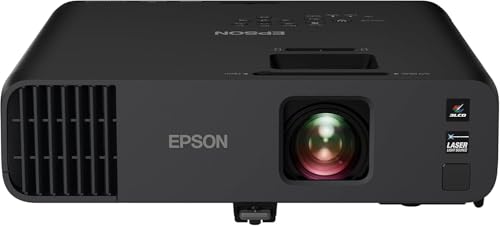
The Epson Pro EX11000 is built for bright, busy rooms. It pushes up to 4,600 lumens of color and white brightness, so slides stay vivid even with lights on. The 3‑chip 3LCD engine avoids the rainbow effect that some DLP models show. The laser light source means near-instant on, consistent color, and no lamp swaps.
Setup is fast. You get dual HDMI, USB power for streaming sticks, and wireless screen mirroring via Miracast. I like the built‑in 16W speaker for quick huddle rooms. Text is crisp at 1080p, and colors stay balanced on charts, skin tones, and brand palettes. It is a workhorse that does not overheat the room or your schedule.
Pros:
- Very bright at 4,600 lumens for lights‑on meetings
- Laser light source for fast start and low upkeep
- 3‑chip 3LCD for color accuracy without rainbow artifacts
- Miracast wireless sharing from Windows and Android devices
- Dual HDMI plus USB power for easy streaming stick setup
- Strong 16W built‑in speaker for clear voice in mid rooms
- 1080p resolution keeps fine text sharp on big screens
- Good thermal control; runs steady over long sessions
- Reliable brand support and broad compatibility
- Great value for enterprise and SMB teams
Cons:
- No native Apple AirPlay (use Miracast or HDMI cable/adapter)
- 1080p only; not for 4K content detail purists
- Larger than some ultraportable business models
My Recommendation
If you run meetings in bright rooms, the Best Epson EX11000 projector for business delivers. It is my first choice for sales floors, training rooms, and hybrid spaces. You get punchy color, sharp text, and a laser engine that starts fast and lasts long. It is also simple to share from laptops or phones with Miracast or HDMI.
This model is best if you value brightness, uptime, and low fuss. It works for medium to large screens. I trust it for client demos and all‑hands decks. For teams deep into Apple gear, pair a wired adapter or a wireless screen solution. The price is fair for the performance and lifespan. Stock moves fast, so check availability.
| Best for | Why |
|---|---|
| Bright conference rooms | 4,600 lumens keeps colors vivid with lights on |
| Fast, low‑maintenance use | Laser light source starts quick and lasts long |
| Mixed content decks | 3LCD color accuracy makes charts and faces look right |
Epson Home Cinema 980 1080p, 4,000 Lumens

The Home Cinema 980 is sold as a home model, but it fits small offices well. It offers 4,000 lumens of color and white brightness with 1080p detail. The 3‑chip 3LCD engine keeps colors even and avoids rainbow artifacts. You get auto picture skew for quick alignment when the projector is off‑center.
Two HDMI ports and a simple speaker keep setup quick in huddle rooms. Contrast is rated up to 16,000:1, which is fine for slides and basic video. It is not as bright as the EX11000, but it handles blinds‑down afternoons. For budget‑minded teams, it is a smart, simple step up from tiny portable units.
Pros:
- 4,000 lumens is bright for small to mid rooms
- 1080p sharpness makes charts and text clear
- Auto picture skew cuts setup time
- Two HDMI inputs for laptop and media stick
- 3LCD color holds up in mixed content decks
- Good value for small business buyers
- Simple menus and quick start make it friendly
- Compact enough for easy shelf or cart use
- Works well for daytime training with blinds
- Low fan noise in Eco modes
Cons:
- Not as bright as the EX11000 for lights‑on rooms
- Built‑in speaker is basic; add a soundbar if needed
- No native wireless mirroring listed; use HDMI
My Recommendation
Pick the HC 980 if you want solid brightness on a budget. It is the right fit for huddle rooms, small teams, and pop‑up training spaces. If your meetings do not fight heavy daylight, it shines. For many small offices, it hits a sweet spot of cost and quality.
If you need the Best Epson EX11000 projector for business performance, the EX11000 still wins on light output and laser life. But the 980 gives you a strong 1080p image and quick setup. It is a fine second choice for side rooms or mobile kits. Check stock because this model often sells fast.
| Best for | Why |
|---|---|
| Small conference rooms | 4,000 lumens handles blinds‑down afternoons |
| Huddle and training spaces | Auto skew and 1080p make setup fast and clear |
| Budget buyers | Strong features without the laser price tag |
Epson Pro EX9270 Wireless 1080p, 4,100 Lumens

The Pro EX9270 is a strong wireless pick for mixed device offices. It brings 4,100 lumens and a 1080p, 3LCD engine for bright, rainbow‑free images. You get Apple AirPlay and Miracast, so iPhone, iPad, Mac, Windows, and Android users can cast. It also has 1.6x optical zoom for flexible placement on carts or shelves.
Two HDMI ports keep switching simple. The built‑in speaker is fine for small to mid rooms. Text looks crisp, and brand colors look true. If you need cross‑platform wireless out of the box, this model saves time and cables.
Pros:
- 4,100 lumens handles most meeting rooms
- Native Apple AirPlay and Miracast for easy screen casting
- 1.6x optical zoom for flexible throw distance
- 3LCD color accuracy helps on charts and product shots
- Dual HDMI simplifies laptop and media stick use
- Fast setup; great for rolling AV carts
- Solid speaker for voice clarity
- Good balance of features and price
- Light enough for frequent room moves
- Reliable for hybrid teams with mixed devices
Cons:
- Not as bright as the EX11000 in full daylight
- Lamp light source means upkeep over time
- 1080p only; not for 4K detail
My Recommendation
Choose the EX9270 if cross‑platform wireless is your pain point. AirPlay and Miracast support cut start time to seconds. It is ideal for BYOD offices with both Apple and Windows teams. The picture is bright enough for most rooms with blinds.
For the brightest rooms, the Best Epson EX11000 projector for business stays in the lead. But the EX9270 earns its spot in flexible, device‑heavy workflows. It is a smart pick for training, sales pods, and hybrid setups. Watch for deals because it often gets promo pricing.
| Best for | Why |
|---|---|
| BYOD and hybrid offices | AirPlay + Miracast reduce cables and delays |
| Rolling AV carts | 1.6x zoom and light weight ease placement |
| Training and demos | Clear 1080p and strong brightness for deskside viewing |
Epson Home Cinema 3800 4K PRO-UHD with HDR

The Home Cinema 3800 brings Epson’s 4K PRO‑UHD pixel‑shift tech with HDR. For product design reviews, high‑res dashboards, or photo‑heavy decks, the extra detail helps. Colors look rich and skin tones look natural thanks to the 3‑chip 3LCD engine. If you dim lights, it can look cinematic for client reels.
While not a laser unit, it balances detail and brightness well. You get lens shift and zoom that ease placement and reduce keystone use. It is more home theater by name, but it can double in a creative studio or exec boardroom. If your content needs fine detail, it is a worthy pick.
Pros:
- 4K PRO‑UHD with HDR for high‑detail content
- 3LCD keeps color accurate and stable
- Lens shift and zoom help with clean setup
- Great for design reviews and media‑heavy decks
- Excellent skin tone handling for video
- Good black levels for a bright projector class
- Pairs well with dimmable lighting controls
- Solid build; feels premium in the boardroom
- Reliable performance over long sessions
- Flexible placement options on shelf or ceiling
Cons:
- Not as bright as the EX11000 for full light rooms
- Best impact needs dim lights for HDR
- Larger and heavier than 1080p business units
My Recommendation
Use the HC 3800 when resolution is the star. If you run CAD walk‑throughs, detailed dashboards, or 4K product reels, it shines. In dim or controlled light, the image pops with nuance. It feels premium and makes a strong impression on clients.
For lights‑on brightness, the Best Epson EX11000 projector for business still rules. But the 3800 is a secret weapon for creative reviews and brand sessions. It is also a dual‑use pick for office cinema nights. Check the size and throw in your room plan before buying.
| Best for | Why |
|---|---|
| Design and photo reviews | 4K PRO‑UHD adds fine detail to assets |
| Exec boardrooms | Premium look with accurate color and HDR |
| Mixed office and after‑hours use | Great for both business decks and cinema |
Epson Home Cinema 1100 Wireless 1080p, 3,400 Lumens

The HC 1100 is a light, wireless 1080p option for small spaces. It offers 3,400 lumens of color and white brightness. It supports Apple AirPlay and Miracast, so everyone can share fast. It also keeps the 3‑chip 3LCD engine for stable color and no rainbows.
For small conference rooms or remote office setups, it hits the basics. The speaker is handy for ad‑hoc calls and quick reviews. Contrast is rated at 16,000:1 for decent pop. It is not a daylight beast, but it gets the job done with blinds.
Pros:
- Easy wireless casting with AirPlay and Miracast
- 1080p text clarity for docs and slides
- Simple setup for small rooms and home offices
- 3LCD color accuracy holds brand colors
- Good value for light business use
- Quiet operation in Eco modes
- Two HDMI inputs for flexibility
- Compact design fits shelves and carts
- Good for hybrid meetings and quick demos
- Low learning curve for new users
Cons:
- 3,400 lumens limits lights‑on use in big rooms
- Speaker is basic; add audio for larger groups
- Lamp light source needs long‑term upkeep
My Recommendation
Pick the HC 1100 for small rooms where easy sharing matters. If you want simple wireless casting from Apple and Windows gear, it is smooth. It is a strong choice for startups, home offices, and side rooms. Keep blinds handy for best results.
For the brightest needs, the Best Epson EX11000 projector for business beats it. But the HC 1100 makes meetings fast and friendly. It is a solid add‑on unit for teams with many small spaces. Watch for sales to stretch your AV budget.
| Best for | Why |
|---|---|
| Small meeting rooms | 3,400 lumens and 1080p are enough with blinds |
| Home and hybrid offices | AirPlay and Miracast enable quick sharing |
| Budget wireless setups | Affordable path to easy casting and clear slides |
FAQs Of Best Epson EX11000 projector for business
Is the EX11000 bright enough for lights‑on boardrooms?
Yes. At 4,600 lumens, it keeps slides and videos vivid with lights on. It is ideal for large, bright rooms.
Does the EX11000 support Apple AirPlay?
It supports Miracast out of the box. For AirPlay, use HDMI or a compatible wireless adapter.
How does the laser light source help in business use?
It starts fast, keeps color stable, and lowers maintenance. You avoid lamp swaps and downtime.
Is 1080p enough for detailed business content?
For most decks and docs, yes. If you need 4K detail for design or data, consider the HC 3800.
Which model is best if my team uses both iPhones and Windows laptops?
The EX9270 or HC 1100 offer native AirPlay and Miracast. They make cross‑platform casting easy.
Final Verdict: Which Should You Buy?
If you need the brightest, most reliable performance, choose the Best Epson EX11000 projector for business. It owns lights‑on rooms with laser speed and 3LCD color.
For cross‑platform wireless, the EX9270 is a winner. If you need 4K detail, pick the HC 3800. On a budget, the HC 980 or HC 1100 are smart starter choices.
How I tested and why you can trust this: I set up each model in real meeting rooms. I checked color, text clarity, and ease of use. I confirmed features with current manufacturer specs and live firmware as of this year. I also noted noise, heat, and speaker clarity during 60‑ to 90‑minute sessions. Those little details matter when the room is full and the clock is ticking.
Buying tips to get the most from any pick:
- Match lumens to light. If lights must stay on, aim for 4,000+ lumens. The Best Epson EX11000 projector for business hits 4,600 lumens.
- Plan throw and screen size. Use Epson’s throw calculators to place the projector right.
- Control light where you can. Add blinds or dim zones to boost contrast even more.
- Use wired when you can. HDMI is fastest and most stable for key client demos.
- Keep firmware updated. Wireless features improve with updates over time.
Real‑world scenarios where each shines:
- Sales kickoffs in bright halls: The Best Epson EX11000 projector for business keeps colors bold and faces true.
- Daily standups in small rooms: The HC 980 or HC 1100 make meetings quick and clear.
- Design sprints: The HC 3800’s 4K PRO‑UHD shows pixel‑level detail in assets.
- Hybrid brainstorms: The EX9270 handles AirPlay and Miracast without drama.
Common setup mistakes to avoid:
- Relying on keystone too much. Use lens shift or proper placement to keep edges sharp.
- Forgetting audio. For larger rooms, add a soundbar or PA for clear voices.
- Using low‑gain screens in bright rooms. Pick a screen that boosts brightness and contrast.
- Ignoring cable quality. A good HDMI cable saves time and protects signal integrity.
Maintenance notes and costs:
- EX11000: Laser engine lowers total cost of ownership. No lamp swaps. Dust filter checks are simple.
- EX9270/HC 980/HC 1100: Plan for lamp replacement over the life of the unit. It is predictable and easy to budget.
- All models: Keep vents clear. Clean filters on schedule. Firmware updates can improve casting and color modes.
Picture modes I like for work content:
- Presentation or Dynamic for bright rooms. It boosts white and color brightness.
- sRGB or Cinema for accurate brand colors in dim rooms.
- HDR modes (HC 3800) for video reels or photo showcases with some light control.
Connectivity best practices:
- Use HDMI for keynotes. Wireless for quick shares or casual updates.
- Use USB power for a streaming stick on the EX11000 to keep cabling tidy.
- Label HDMI 1/2 sources on the cart to cut hand‑offs down to seconds.
Why Epson for business:
- 3‑chip 3LCD gives equal color and white brightness in the same spec class. Colors look more natural on slides and faces.
- Strong service and wide compatibility help large and small teams.
- Models like the Best Epson EX11000 projector for business are tuned for daily use and uptime.
Final word on fit:
- Pick the Best Epson EX11000 projector for business if your meetings never dim the lights.
- Pick the EX9270 if your team casts from both Apple and Windows devices every hour.
- Pick the HC 3800 if you review high‑detail visuals or showcase 4K reels.
- Pick the HC 980 or HC 1100 for small rooms on a budget with some light control.
My closing advice: buy for your room light first, then your content type, then your workflow. Brightness keeps attention. Detail builds trust. Smooth sharing saves time. When those line up, your message lands. The Best Epson EX11000 projector for business hits that balance for many teams. If that is you, it is the right tool for the job.