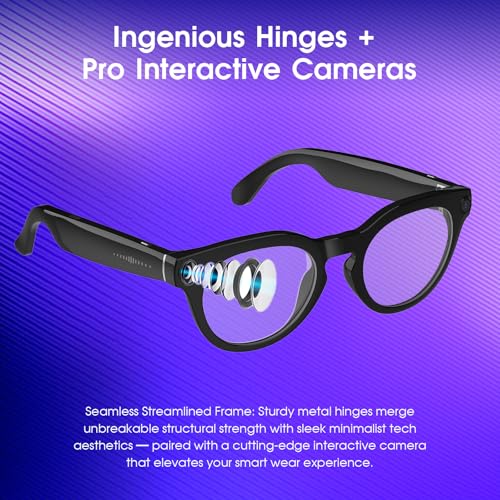
Wear them, set hands-free capture, frame your POV, and narrate naturally.
If you want real, first-person footage without juggling a camera, smart glasses deliver. I’ve shot city walks, hikes, and street food tours with them, and the difference is massive. In this guide on how to use smart glasses for travel vlogging, I’ll break down the gear, the settings, the shooting habits, and the legal side so you can record smooth, honest stories that people want to watch.

Why smart glasses shine for travel vlogs
Smart glasses turn your eyes into the camera. You get a true point of view with both hands free. This helps you capture moments that would be awkward with a phone or a big rig.
- You look natural on camera. You can talk while walking, paying, or holding a bag.
- You react in real time. The viewer feels what you feel, at the speed you move.
- You shoot more, miss less. There is no lens cap or setup pause. You just go.
I learned fast that first-person clips hook viewers who like to “come with me.” If you want to master how to use smart glasses for travel vlogging, it starts with this idea: record what your eyes notice, and let your voice guide the story.

Choosing the right smart glasses for travel vlogging
Pick glasses that match your trip, your face, and your style. Specs matter, but comfort matters more. You will wear them for hours.
Look for these features:
- Camera quality. Aim for 4K at 30 fps or 1080p at 60 fps. Check low-light tests.
- Stabilization. Optical or strong electronic stabilization is a must for walking shots.
- Microphones. Dual or triple mics with beamforming and wind reduction perform best.
- Battery life. At least 60–90 minutes of active capture per charge. A charging case helps.
- Storage. 32–64 GB internal or fast offload to phone. Check file size per minute.
- Controls. Reliable voice commands and simple touch gestures reduce missed shots.
- Fit and comfort. Light frames, secure temples, and nose pads that do not pinch.
- Lenses. Polarized sun lenses for day. Clear lenses for night. Swappable is ideal.
- Weather. Splash resistance is helpful. Avoid heavy rain unless rated for it.
- Privacy lights. A visible recording indicator builds trust and avoids conflicts.
When you compare models, try them on. Do a 10-minute walk test. If the bridge slips or the frames pinch, move on. If you want a smooth start on how to use smart glasses for travel vlogging, pick a pair you forget you are wearing.

Setup and settings before you fly
A smart setup saves you on the road. Do this before you leave home.
- Pair with your phone. Update firmware. Test voice commands in a quiet and a noisy room.
- Fit the frames. Adjust nose pads. Make sure the camera sits level with your eyes.
- Pick your base video mode.
- 4K 30 fps for detail and slow walks.
- 1080p 60 fps for action or biking trails.
- Turn on stabilization. Use horizon lock if offered.
- Set audio. Enable wind reduction. Test in front of a fan to hear the effect.
- Pick photo mode. Set HDR for mixed light. Turn off if it causes ghosting with motion.
- Auto-backup. Enable fast offload to the app when on Wi‑Fi.
- Privacy and safety. Keep the recording LED on. Set a voice cue like “Recording started.”
Independent testing and maker specs agree: higher resolution drains battery faster. If you plan a long day, start with 1080p 60 and switch to 4K for key scenes. This small shift is a smart move for how to use smart glasses for travel vlogging without battery panic.

Shooting techniques that make POV footage watchable
First-person video can feel wild if you move too fast. Train your body like a human gimbal.
- Walk smooth. Bend the knees a bit. Keep steps short on stairs.
- Move your head slow. Turn with your body, not only your neck.
- Hold a scene. Count to five on each shot before moving on.
- Lead with your eyes. Look at what you will show before you describe it.
- Use anchor points. Pause near signs, doors, or food plates to reset the view.
- Build transitions.
- Hand swipe in front of the lens.
- Look down then up to a new scene.
- Whip pan but keep it gentle.
- Capture B‑roll. Textures, crowds, door handles, neon signs, train wheels, steam from food.
- Talk to camera. Keep sentences short. One idea per breath.
- Use voice commands. Start and stop clips without touching the frames.
When I guide friends on how to use smart glasses for travel vlogging, I tell them to think like a tour guide. Show one thing at a time. Speak to one viewer, not a crowd.
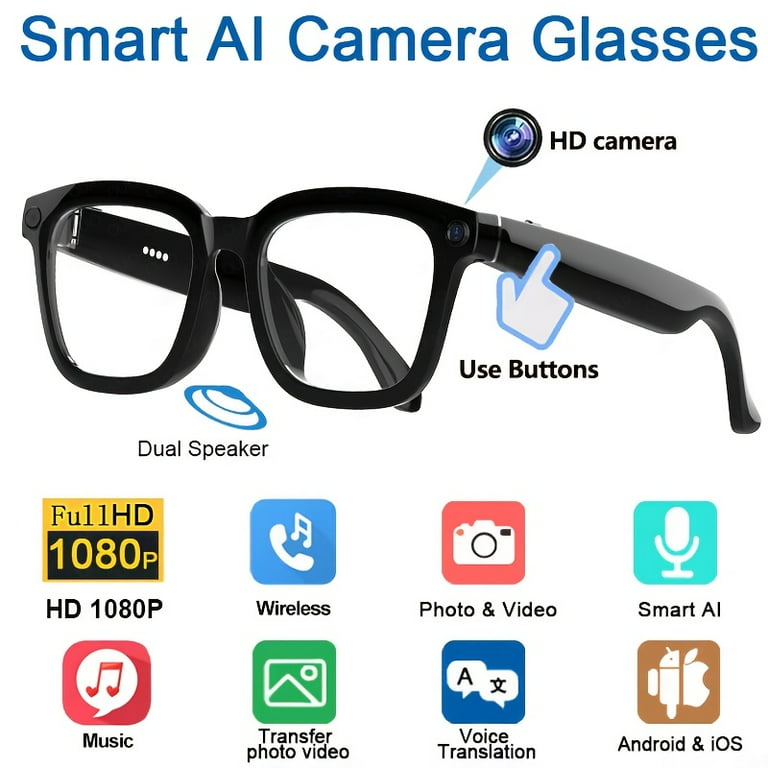
Audio that does not ruin your vlog
Viewers forgive shaky clips. They do not forgive bad sound. Your mic plan matters.
- Face the subject. Your voice will be clearer if the mics point toward you.
- Fight wind. Use wind reduction. Turn your face sideways to gusts. Shield with a hand.
- Record backup audio. Clip a small lav to your shirt and record to your phone.
- Sync fast in edit. Clap once on camera at the start of a scene.
If you record street food or markets, step two feet closer than you think. The gain on many glasses is modest. This one habit is a quiet secret in how to use smart glasses for travel vlogging with strong, warm sound.

Power, storage, and heat on long days
Nothing kills a vlog like a dead battery or a full drive. Plan a simple field workflow.
- Carry power. Bring a slim power bank and a short cable. A charging case is gold.
- Rotate capture. Shoot key scenes in 4K. Use 1080p for travel links and filler.
- Offload often. Move clips to your phone at lunch and at dinner.
- Clean as you go. Delete throwaways in the app while waiting in line.
- Watch heat. High sun and 4K can overheat frames. Take short breaks in shade.
- Respect rules. On planes, follow crew guidance on electronics.
Tests show that quick, short clips save heat and battery. Think in scenes, not in long takes. That habit also speeds edit time when you get back.
Edit a first-person story viewers finish
Editing is where a walk turns into a story. Keep it tight and clear.
- Build a hook. Start with the best five seconds. Add an on-screen title.
- Trim hard. Cut every pause and stumble. Keep each shot 2–4 seconds unless it needs more.
- Mix angles. Add a few phone or camera shots to break up POV fatigue.
- Stabilize. Use in-app stabilization if your glasses lack gyro-based tools.
- Fix color. Warm up skin tones. Drop highlights on bright streets.
- Add captions. Many people watch on mute. Keep lines short and high-contrast.
- Sweeten audio. Reduce hiss. Cut harsh peaks. Add soft ambient music under voice.
- End with value. Tip, price, map pin, or a “what I would do next time.”
When I coach on how to use smart glasses for travel vlogging, I stress retention. Watch the first 30 seconds with a friend. If they reach for their phone, recut the start.
Safety, etiquette, and legal must‑knows
Travel vlogging is public. Be a good guest and a safe one.
- Ask when in doubt. Staff at cafes or shops often say yes if you explain.
- Respect no-cam zones. Some museums, airports, and borders forbid recording.
- Use the indicator. Keep the recording light on so people know.
- Protect kids and private talks. Avoid faces when possible. Frame down to hands and food.
- Store smart. Lock your phone and app. Back up to encrypted cloud when you can.
- Know local law. Rules vary by country on consent and privacy in public.
Trust is core to how to use smart glasses for travel vlogging. A quick smile and “Mind if I record this?” goes a long way.
Monetization and analytics for POV creators
Your glasses can power a channel or side income with the right plan.
- Pick platforms. Use vertical for Shorts, Reels, and TikTok. Use wide for YouTube travel guides.
- Batch content. One walk can become a teaser, a full vlog, and three tips clips.
- Track numbers. Watch retention, first 10 seconds, and average view duration.
- Test hooks. Try price reveals, “watch to the end,” or fast location names on screen.
- Add offers. Link maps, gear lists, or city guides. Use affiliate links with clear labels.
- Diversify. Sell presets, itineraries, or host paid live walks.
Data from creator tool dashboards shows that strong hooks and clear value lift completion rates. That is key to how to use smart glasses for travel vlogging that pays you back.
Troubleshooting and pro tips from the road
Little issues can ruin a day. These fixes are fast.
- Lens smudges. Wipe often with a microfiber cloth. Sunscreen is the main culprit.
- Fogging. Use anti-fog wipes. Lift frames a bit when moving from cold to hot.
- Low light. Slow your walk. Use 30 fps. Stand near lit signs or windows.
- Harsh sun. Face away from noon sun. Use polarized lenses. Lower exposure a notch.
- Rain. If not water rated, tuck into a hat brim or pause and shoot B‑roll later.
- Backup plan. Carry a tiny action cam for wide scenes inside dark sites.
Keep notes after each day. What failed? What worked? These logs sharpen how to use smart glasses for travel vlogging on your next trip.
Frequently Asked Questions of How to use smart glasses for travel vlogging
What frame rate is best for walking tours?
Use 4K 30 fps for detail and calm walks. Use 1080p 60 fps for fast motion to reduce blur.
How do I keep my footage from looking too shaky?
Move your head slow and turn with your body. Hold each shot for five seconds and let stabilization do the rest.
Can I vlog in crowded markets without annoying people?
Yes, but be polite and brief. Keep the recording light on, avoid close face shots, and ask vendors before filming their stall.
Do I need an external mic with smart glasses?
You can vlog with built-in mics if you work the angles. For windy days, a small lav to your phone as backup is smart.
How long can I record on one charge?
Most glasses handle 45–90 minutes of clips, not one long take. Bring a power bank or charging case to top up at breaks.
What is the best way to edit on the road?
Use a phone editor to cut, stabilize, and caption during transit. Save a full edit pass for your hotel or flight.
Is it legal to record in airports or trains?
Rules vary by country and even by terminal or operator. Look for signs and ask staff; if told no, stop at once.
Conclusion
Smart glasses let you bring viewers into your journey with ease and honesty. If you follow these tips on how to use smart glasses for travel vlogging, you will shoot smooth clips, clear audio, and fast edits that people want to finish. Start small, learn fast, and level up each day.
Take one city block and try this workflow today. Then share your best five seconds at the top of your next video. If this guide helped, subscribe for more hands-on travel creator tips or drop a comment with your setup.